PostgreSQL in R
A tutorial on using PostgreSQL in R. Includes database setup, table creation and extracting information using SQL queries. Also hosted on my Github pages.
PostgreSQL and pgAdmin

PostgreSQL is described as “The World’s Most Advanced Open Source Relational Database”. To get started with this tutorial you will need to install PostgreSQL on your computer. Please follow the detailed instruction on https://www.postgresql.org/ to install the software. *During the installation process you will be asked for a password for the PostgreSQL root user account, which you will need to remember to connect to your databases later.
The software “pgAdmin” will be installed as part of the installation process, which is the GUI used to monitor your databases.
Getting started with pgAdmin
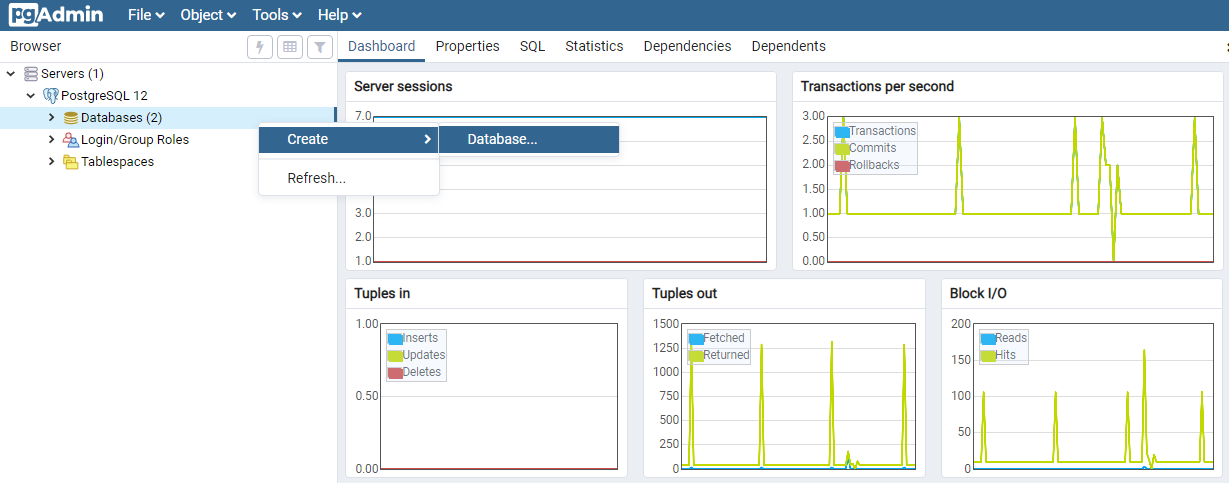
Once you open the pgAdmin software, a new browser window will open showing your existing PostgreSQL servers, and a dashboard of your current server sessions. To create a new database, open the servers tab (you will be asked to insert your root password) and select your default server. Right click on the Databases tab and select Create > Database. In the Create-Database window that pops up enter a database name (AUSNUT in our example) and hit save. You will now see a new local database in the Databases tab.
Creating PostgreSQL database tables using R
Creating databases using pgAdmin can be a lengthy process, where the columns and corresponding datatypes of your new database need to be entered one by one. Instead we will use R to create the structure of our new database, and send it to PostgreSQL.
To start we will install and load the required packages for this tutorial.
install.packages("dplyr")
install.packages("DBI")
install.packages("RPostgres")
install.packages("getPass")

library(dplyr)
library(DBI)
library(RPostgres)
Now we want to connect R to our PostgreSQL database. We will create a “PqConnection” called “con” using the dbConnect function. The user refers to the owner of a database in pgAdmin, which you can see by right clicking on your database and viewing the properties. dbname is the database name as shown in pgAdmin. When you run this line a pop up window will open and you will need to enter the password for this database (root password).
*Note: It is discouraged to type your database password directly into your R Markdown file or console. Instead it is encouraged to run getPass::getPass(“”) which will open a popup window where the password can be entered. getPass works when knitting a document, whilst rstudioapi::askForPassword(“”) or .rs.askForPassword(“”) will not work.
con <- dbConnect(RPostgres::Postgres(), user = "postgres", password = getPass::getPass("Database password"), dbname = "AUSNUT")
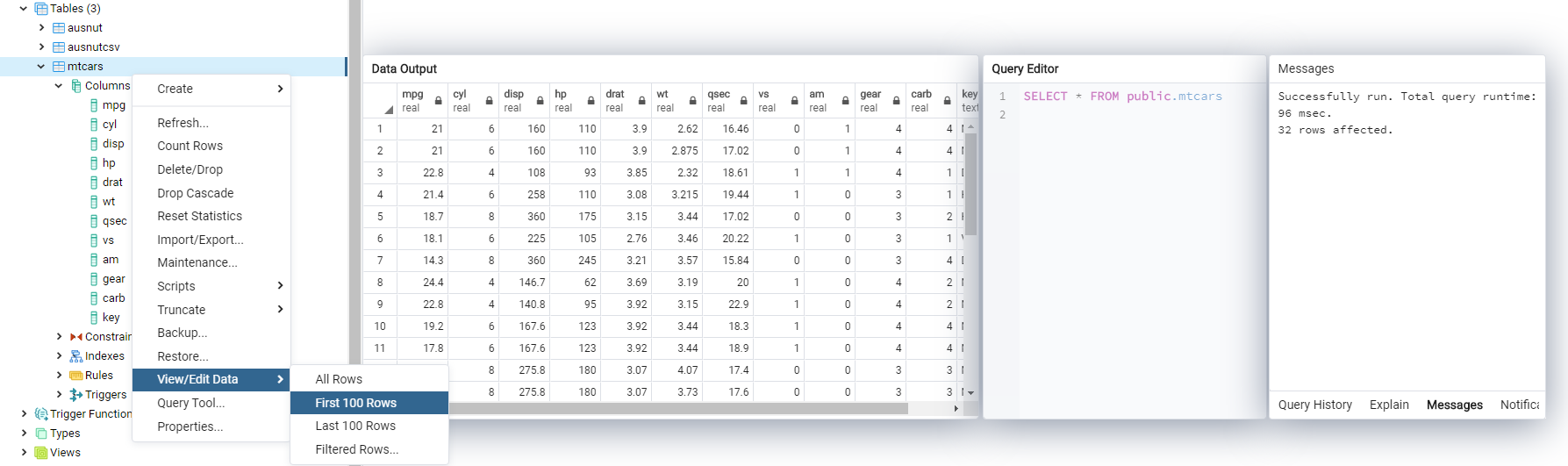
To add a table to our PostgreSQL database from R we would use the “dbWriteTable” command using our connection “con”, setting a database name and selecting a dataframe. The overwrite command needs to be set to TRUE if you want to overwrite an existing table. *Note: The column names from mtcars are all lowercase, which is encouraged when creating column names in PostgreSQL. Once you run this command the table will appear in pgAdmin.
dbWriteTable(conn = con, name = "mtcars", mtcars %>% mutate(key = row.names(.)), overwrite = TRUE)
Interacting with our new PostgreSQL table
Lets use some basic commands to interact with the new table we created. Go ahead and run the following lines of code to:
- Extract the names of the tables present in your PostgreSQL server.
- View the column names of the “mtcars” table.
- Read the “mtcars” table from PostgreSQL into R.
dbListTables(con)
dbListFields(con, "mtcars")
dbReadTable(con, "mtcars")
In some cases you may not want to load all data into R, especially if the table is very large. Instead we can load a selection of the data based on certain criteria, using SQL queries. To extract data using SQL commands, we will use a combination of the dbSendQuery and dbFetch functions. Here we select all columns (*) from the table mtcars, for the rows in which hp is greater than 90 and cyl is greater than 6. Finally we will remove our connection to the PostgreSQL server.
res <- dbSendQuery(con, "SELECT * FROM mtcars WHERE hp > 90 AND cyl > 6")
dbFetch(res)
dbClearResult(res)
dbDisconnect(con)
By now you will know how to set up a PostgreSQL server and connect to it using R. In the near future I will add a new tutorial explaining data visualization using data extracted from databases.